

Taking the pain out of cross reference creation…
Quick Reference is a script created to simplify the process of creating cross references. Thanks to David Blatner on his helpful suggestions when we were creating this script. You can read more about Quick Reference on InDesign Secrets here.
Creating cross references in InDesign is a somewhat painful process. You need to find the destination, and create a destination anchor. You then need to select the source text and create the new cross reference. You can also use references to text without anchors, but that’s even more painful to create.
We created Quick Reference to make this process less painful. To use Quick Reference, you just select the source text, and Quick Reference will give you a list of potential destinations. You just select the correct one, and hit enter. Quick Reference will do the rest of the work for you.
Installation:
We are including two different files for download: a zip file of the script, and an Extension Manager “mxp” file. You can use either one to install the script. Please download one (or both) of the files from here: Extension Manager File or Zip File
Installation using Extension Manager:
Installation should be as simple as a double click on the “MXP” file.
If you have CS3 installed, you might get an error when trying to open the file such as the one shown:
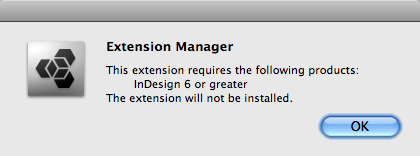
This is because Extension Manager (CS3) is trying to open the package and does not recognize CS4. If you get this error, you will need to install manually or to change the default application which opens the mxp file to Extension Manager CS4.
To install manually, open Extension Manager CS4 and click on the install button shown:

Once Extension Manager installs the script, you can enable and disable the script in Extension Manager:

If using Extension Manager is too much trouble, you can install the script manually.
To do this, download the zip file and decompress it.
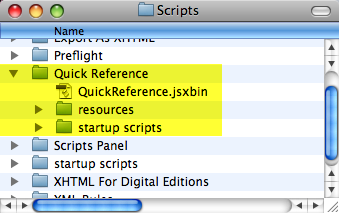
You’ll need to place the whole folder as-is in you main scripts folder:
Usage:
Using Quick Reference is easy.
- Select Source Text:
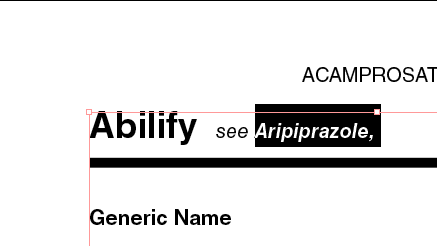
Select Source Text
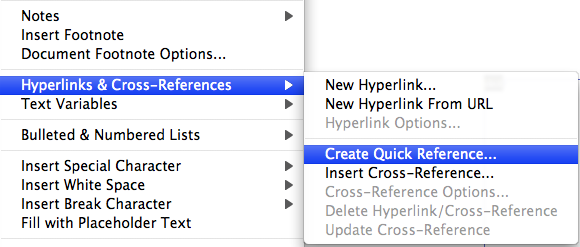
- Select Create Quick Reference:
- Select the destination in the dialog:
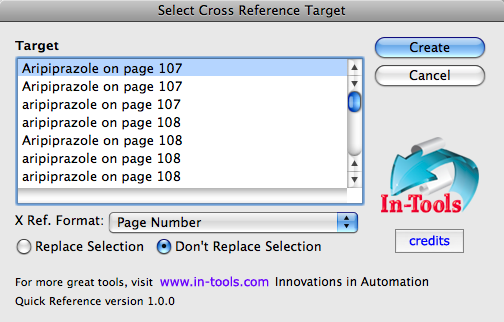
- When you have the correct destination selected, hit Create, and you’re done!
A few tips on the use of Quick Reference:
- You must select the correct Cross Reference Format to use for your cross reference. (You can create or change them in the cross reference panel.) The selection should be the last format used in your document
- Quick Reference will either replace the current selection with a cross reference, or append the cross reference to the end of your selection. You should select the correct radio button.
- Quick Reference ignores trailing punctuation and spaces. If you want punctuation and/or space between the selected text and the cross reference make sure you select the trailing punctuation and/or trailing space.
- The listing of destinations will usually be in order within the text, so the correct destination will usually be the top one on the page.
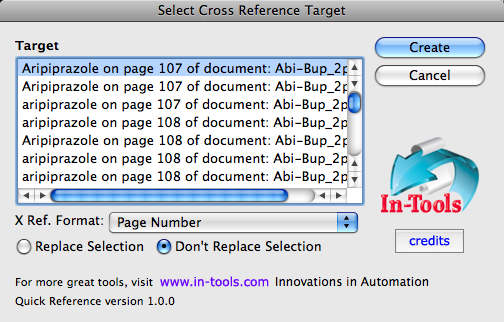
- If the document is part o a book and the book document is open. Quick Reference will find destinations in the entire book. When this is the case, the name of the destination document will appear in the list of destinations.

[…] You can download the script and find complete installation instructions by visiting this page at In-Tools.com. […]
Wow – this is really a useful tool – saving a lot of time and concentration
thx
Eh… but where is the actual link to download…??
Right at the beginning of the installation instructions…
Here’s the links again:
here’s the Extension Manager file
here’s the zip file
I’ve just uploaded a version 1.0.1 update which works better with numbered paragraphs. Download it from the same download locations.
Ah! There they were, the whole time 😉 Thanks!
And… error on my Dutch version of InDesign Cs4 6.04…
Won’t load…
(Object error)
(I have Cross refs Pro however myself, but would be nice to show this)
Just uploaded version 1.0.2 which fixes a bug that shows itself when the destination is earlier in the same story. (Same download location.)
I’ve just uploaded version 1.0.3 which fixes the bug F vd Geest found in the Dutch localized version as well as another loading issue. Thanks a lot F vd Geest!
does this work with CS2?
No. It’s CS4-only (since it makes use of Cross-References introduced in CS4).
thanks a lot (Y)
Hi Harbs,
thanks for this… wonderful, it works a treat. At least it did in the beginning when I had added a few cross-refs. However, after I added 70 or so to a doc, it won’t let me access the hyperlinks panel without crashing.
I keep getting bad access errors, something to do with loading the plug-in. I get these a lot with Acrobat, but never before with InDesign. Not sure whether my set-up (CS4/10.5.8/PowerPC). Any tips or advice would be greatly appreciated.
Regards
Damian
Hmm.
I’ve never encountered that. It sounds like there’s some kind of corruption in the file. Did you try exporting to IDML?
hi Harbs,
thanks for the quick reply and apologies for not getting back sooner. I hadn’t had time to run a few tests. I’ve tried exporting the file as you suggest and also tried deleting pages/links. Every time I call up the hyperlinks panel it crashes. The only thing that worked was when I stripped out all links… i.e. they were listed but broken.
Perhaps I did something wrong, or maybe its the just the OPS/CS4 combination (CS2 seemed a lot more stable than CS4, never had any problems with that).
Here is the relevant line from the crash report:
Thread 0 Crashed:
0 PMString::Compare(short, PMString const&) const + 28
Perhaps that makes sense to you? Be great if you could pinpoint the problem, otherwise thanks for the effort. I’ll muck around some more and let you know if I can figure it out.
Regards
Damian
Hi Harbs,
I’ve been running this script quite successfully for the last couple of days, and thanks very much, it’s a real help. But it’s a lot of clicks to get to it when doing many cross-refs, and I can’t figure out how to apply a keyboard shortcut to it. Any ideas?
Thanks.
Phil
You can assign a shortcurt via the shortcuts option in the edition menu. Then choose the script option and locate the script. Then choose a shortcurt of your preference… and enjoy!
Wow! Thanks a lot of a lot! This is a great script!
Nonetheless I had some trouble while indexing text patterns of this kind: [1], [2], [3], etc. Probably because of the [] caracters which the script didn’t seemed to like very much… the return results list of the search was unrealistic. Anyway, I had to change the [number] pattern by [TAG+number+TAG] so that it work flawlessly. The script doesn’t seem to handle well the [] signs or . So it’s impossible to use them for tagging and making easier the crossreference process.
Thanks again a lot!
Using CS4, I run the script and try to replace selection option, and not replace option. I get Javascript errors 30477 and 21 respectively. I cannot get it to function in any fashion. Any thoughts?
Update. Looks like I changed some documents in the book and did not save and update it correctly. My bad.
Excellent script! It doesn’t seem to work for Hebrew, though. It generates an error that no text is found. When I tried it with English it worked.
Hi Harbs,
I just did a lot of work with cross references etc.
This idea would have been great for me.
However, I installed it as you instructed with the zip file installation (the other way just brought up a screen full of gibberish characters) but I don’t see anything in my InDesign hyperlinks about quick reference.
I can’t seem to find where the options are???
Forget it, I found it.
I was looking under the hyperlinks menu which comes in the drop down menu with a right click.
Anyway,
what happened with the extension manager download,
why did a web page of gibberish come up — and no download???
Thanks
Were you using IE? I’ve heard of problems with IE recognizing zxp files for what they are. Right click and save the file…
No, I was using Safari on Mac.
I have a horrible issue with InDesign slowing to a crawl after I have added cross references to a book. I’m working on manuals that run 200-400 pages and are broken into a dozen or more documents. This extension sounds great, but can it help the performance issue I’ve described? Thanks for your advice.
That’s a known problem with xrefs and there’s no good solution.
I generally advise not to mix xrefs and Book files. One thing you can try (other than combine all the files into one) is to always make sure all your files are open.
Part of the issue with the performance is due to InDesign constantly opening and closing the files in the background.
HTH
This is a life saver, thanks! I was wondering if you could add the option of displaying the highlighted text in only one specified paragraph style. And name your price
Script is great, would love an option to ignore all for replacing, Some books have the notes section already done, I’m working on eBooks, so it would be nice to just find 1., 2. etc and just use them as the ref point and turn them into hyperlink instead of replacing. Overall, great option though.
Harbs:
Do you have a script that can put in a text anchor at the beginning of each page of an InDesign doc? That would be great so that we could like the index page numbers to that point for epub export.
No. Interesting idea. Of course the problem will be text reflow and how to handle those anchors…
The assumption would be that the anchors would be placed only after the book was finalized. Perhaps there could be an “update text anchors” script.
Are there any other scripts that could be modified to do this kind of work?
Are you interested in developing such a script? Any thoughts on cost?
Hi,
I tried to install this script for CS 5.5 and it doesn’t seem to work.
I can’t see the “Create Quick Refence” abnd when I try to run the script, it says error 30619, line 225, name element already exist.
I installed it manually.
Thank you!
Hi Harbs,
I’m running your tool in multi-doc book under CS5.5. As long as I create cross-refs inside a document, it works fine.
When I create a cross-ref from one document to another, the script lets me select a cross-ref target from the list it created.
So far, so good, but when I click “Create”, it only gives out a Warning (originally in German):
” A script caused the following error: Invalid value for parameter “source” of the method “act”. Expected text, received nothing. ”
Do you have an idea what might cause this error, and how to fix it? I cannot use InDesign’s built-in cross-ref funcionality, because it slows down the system way too much.
Many thanks in advance for your help!
Best regards
Jens
I’m not sure what’s causing the error. I’d need the document (and the time) to figure it out.
FWIW, I don’t advise using cross-refs across documents. It causes InDesign to slow down terribly.