

Applying the correct master page has always been an annoying task. AutoFlow Pro offers some really cool ways of automating the application of master pages. Sometimes, though you just want to remove all master pages from pages without any content. If, for example you have master pages set up with page numbers and/or running headers with static content, you probably don’t want those text frames to appear on blank pages.
That’s where this scriptlet comes in. When you run the script, a little dialog pops up asking you to define empty pages:
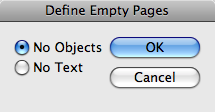
Define Empty Pages
If you select “No Objects”, pages with blank text frames will keep their master pages.
If you select “No Text”, pages with (only) blank text frames will have the applied master page removed.
If all you have is dynamic header text, Power Headers can be set up to not show the headers on pages without text, so this script is not necessary for that.
Tags: Scripts
thanks.
p.s. Little spelling mistake above:
“for example you have “you” master pages”
Thanks. Corrected…
kol hakavod. this is a much needed script