

InDesign has a really nice shortcut for jumping to a specific page in a document: Control/Command J. Prior to CS3 it activated the page number input area at the bottom of the document window, but a lot of people missed that, so Adobe changed it to a dialog which pops up.
However, when working on book files, this command comes up a bit short. If you want to jump to a specific page which might be in a different file (which might not even be open), there’s no quick way to do it.
We created this script to overcome this shortcoming.
To use the script:
- Download the script here.
- Place the script in your Scripts Panel folder.
The easiest way to find the folder is by opening your scripts panel in InDesign (Window –> Automation –> Scripts) and right clicking on one of the items in the panel. Select open in Finder/Explorer. - Run the script.
To run a script, you just double click on it in the Scripts Panel. We recommend assigning a keyboard shortcut (maybe Alt/Option J) to make running the script easier. - This dialog will pop up:
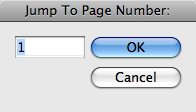
- Type in the page number in your book, and InDesign will take you to that page — even opening the file if it is closed.
Caveats:
- You must type in a number, even if you number your pages with letters.
- The numbers must be absolute numbering from the beginning of your book file. So, if you have front material and the numbering starts a number of pages into the book, you must type in the number starting from the front material — not the start of the numbering.

What if you have 2 books open? I assume it just goes to the book that’s active?
Great point!
The behavior was that it just used the front book, but I just updated the script. It will now present a dialog asking you which book to use.
The newer version is at the same download location.
I have been waiting for this for a long time! Thank you!
This is a really great concept!! The only thing that would make me use it much more would be if you could enter the actual section and page number (ex. 5-3 instead of 128 or 12-1 instead of 150). Is there a possible way to script it so it can achieve this?
Thank you! Keep up the good work!!
Hi Harbs,
thought I should share my script with you. It’s a shorter version of what you have going on. Does the same thing but allows entering of pretty much any type of page number – i, ii, iii, 1, 2, 3, and section numbers as well. Check this out.
Michael
if(app.books.length>0){
var d = app.dialogs.add({name:”Go to Page # in Book”,canCancel:true});
var dCol=d.dialogColumns.add();
dCol.dialogRows.add().staticTexts.add({staticLabel:”Page #:”})
var myBookPg = dCol.textEditboxes.add( {stringList:app.books.everyItem().name, selectedIndex: 0, minWidth:150});
dCol.dialogRows.add().staticTexts.add({staticLabel:”Book:”})
var myBookDD =dCol.dropdowns.add( {stringList:app.books.everyItem().name, selectedIndex: 0, minWidth:150});
var result = d.show();
if(result==true){
var myBook=app.books.itemByName(myBookDD.stringList[myBookDD.selectedIndex]);
for(a=0; a<myBook.bookContents.length; a++){
var fdoc=app.open(File(myBook.bookContents[a].fullName), false);
if(fdoc.pages.itemByName(myBookPg.editContents).isValid){
fdoc=app.open(File(myBook.bookContents[a].fullName), true);
app.activeWindow.activePage = fdoc.pages.itemByName(myBookPg.editContents);
break;
}
fdoc.close(SaveOptions.NO);
}
d.destroy();
}
}