

The issue has come up quite a few times that users of InDesign need to scale placed graphics en-mass. We’ve written quite a few script-lets over the years, but we finally decided to create a UI which gives all the options generally needed in an easy-to-use format.
The script can be downloaded from here, and it supports InDesign CS3 and CS4.
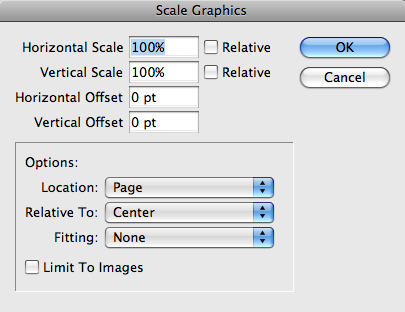
The options are pretty straight-forward:
- Scaling: You can select the horizontal and vertical scale, that you would like to make the images.
- Next to the horizontal and vertical scaling fields, there is a check-mark labeled “Relative”. If this check-mark is checked, the images will be scaled to a percentage of their current size. If the check-mark is not checked, the scaling will be done to absolute values.
- Image Offset: You can set an offset for the images. Please note: The images will be offset — not the graphic frame which contains them. This might change the way an image is cropped.
- Location: Images can be scaled/moved on the current page, spread, or the entire document.
- Relative Location: The graphics can first be centered before they are scaled. If “Centered” is selected, the graphics will be centered within their frames.
- Fitting: There are 6 fitting options, which besides for “None” correspond to the fitting options available in the Object menu.
- Limit to Images: If this check-mark is checked, only raster images will be scaled or moved.

I think this is a great idea!! However, I downloaded the script and I can’t seem to get it to scale ALL the images in my story. I’ve tried selecting “document” in the location field but still nothing. Do you have any suggestions?
After doing some trouble shooting I’m narrowed the problem down to when I select anything from the “fitting” field it doesn’t scale properly. If I leave the “fitting” field to “None” it scales everything but I still have to go back and fit frame to content on EVERY image.
@Dwan:
It sounds like you are talking about inline images. Is that the case?
I don’t remember whether the script supports scaling of inline images…
Amazing script !!!
it would be appreciate to have the possibility to move even or odd pages separately. Maybe you can add a checkbox?
Regards
Nice idea.
I have the same problem with Dwan. Has anybody found a solution?
Flipped images have negative scale for one or both dimentions. The script turns all negative scaling to positive 100%. So images are fliiped/rotated compared after processing, or even fall outside container.
How do you resize both frame and content at the same time?