

One of the most tedious jobs is fitting text to the space it is supposed to take up. A little bigger, a little smaller, wait! the text is different sizes… sigh… Well, here’s a few scripts to help with a couple of different situations…
Before we go on, make sure you download the scripts from here.
Situation #1
You have a headline which must fit to the margin widths. It may even be a two line heading. What to do?
“Fit Text To Frame” to the rescue!
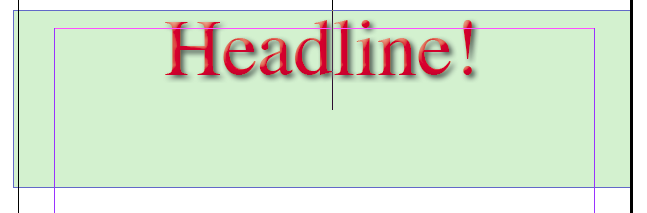
Before
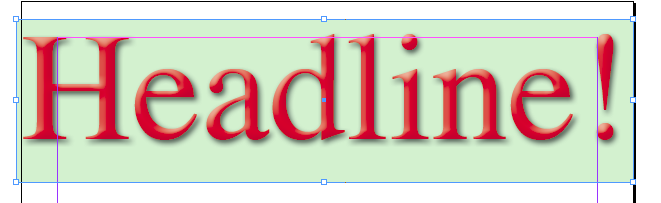
After
There’s two scripts which are used in this situation: FitTextPrefs, and FitTextToFrame.
FitTextPrefs allows you to set some simple preferences for the Fit Text to Frame script. When you run FitTextPrefs, you get presented with a dialog with four options:
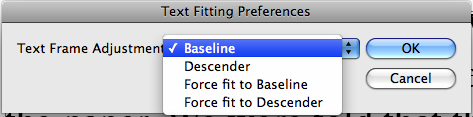
The first two options will expand the text frame down to the bottom baseline or descender respectively only if necessary.
The last two options will move the frame bottom either up or down to fit the frame bottom ensuring that the frame bottom always fits the text.
Once we set the preferences, a simple double-click on the FitTextToFrame script will fit the text of the current frame.
Some quick pointers on using Fit Text to Frame:
- Fit Text to Frame will attempt to bring any overset text back into the text frame. This might result in more than one line.
- If there are multiple lines in the text frame, the text of the longest line will be fit to the frame. All other text will be scaled proportionally.
- Text of different sizes will all be scaled proportionally.
- If all the text cannot be fit, Fit Text to Frame will abort.
- Fit Text to Frame does not adjust leading. If there are multiple lines, it usually works best if the leading is set to “Auto”.
Situation #2
You have the unlucky job of fitting a story into a predefined space. You tried to explain to the client that to properly fit text takes a lot of finesse and very often copy-editing, but they won’t hear of it. You will need to fit the text exactly to the text frame precisely 30 seconds before it goes to press. 😉
Fill Text Frame to the rescue!
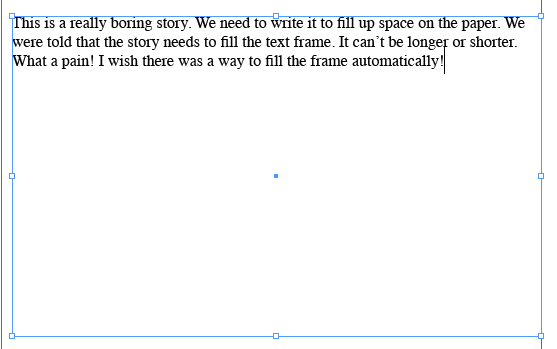
Before Fill
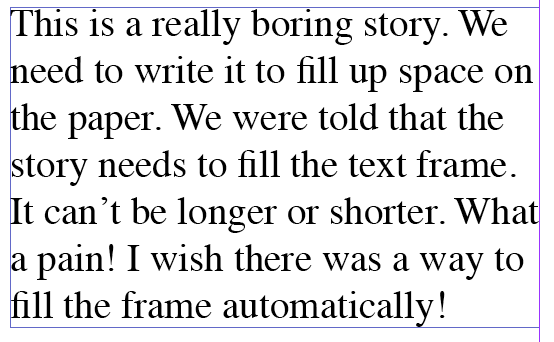
After Fill
Fill Text Frame is really very basic. It will scale all the text currently in the frame to the maximum size that will fit in the frame without spilling out of the frame.
- Fill Text Frame will not bring back any text which is overset.
- Fill Text Frame scales all the text proportionally.
- Fill Text Frame does not adjust leading. It usually works best if the leading is set to “Auto”.

Hey, what about a little window with preview and the possibility to make defined text with different pt sizes smaller or larger by clicking on arrows in defined steps of point, pica, % ???
That is a situation i regular have.
But anyway big thanx for this usefull and awaited scripts!!
[…] First, a script that lets you enlarge text to fit a frame. This is great for headings. (It is similar to a feature in the Blatner Tools “Text Controls” plug-in.) […]
When will be update this script for CS5. please!
The scripts should now work in CS5.
FYI: Works for setting text up a size to fit but will not fit overruns down to fit.
As DSS said, the FitTextToFrame part of the script doesn’t work for InDesign CS5.
Yes. There was a problem with the script in CS5.
I just looked into it and I believe I’ve fixed the problem. You can download the new version from the same download link.
So excited to find these scripts, but I need them to work with a data merge. Is this possible?
I’m not sure what you mean by working with data merge. Can you explain a bit more?
I frequently work with data merges to bring in several entries of text with varying number of characters from Excel docs. I was hoping there were scripts available just like the ones above that I could apply to my defined text space before or after selecting my data source and creating my merge so that the text would automatically scale itself (for each entry) to fit the text space. Does this make sense?
Ah. I see what you mean.
That’s a bit beyond the scope of the script as it stands. It’s an interesting idea though. Maybe I’ll revisit this one day…
Thanks, I would be so grateful if you did!!
I kind-of have a solution using GREP styles. Have prepared a tutorial at http://wp.me/p1x3Yg-4V . Great for headlines, name-tags, price tickets…
Hi, was wondering if you amend the script to allow for each line of text to fit the the frame?
If you have the following text:
Fenchurch
3-drawer
base unit
I want each line to fit to the width of the frame, I know they would be different sizes, but that is what we want.
Is this possible?
[…] Text fitting scripts by Harbs One of the most tedious jobs is fitting text to the space it is supposed to take up. A little bigger, a little smaller, wait! the text is different sizes… sigh… Well, here’s a few scripts to help with a couple of different situations… […]
Hi Harbs
Thanks fot these scripts.
They are all just so helpful!!!
The Fit to text frame script – is it supposed to work on a story in a text frame. I.e., I have overset text in a frame, is it supposed to shrink the text to fit the frame – the same way Fill text to frame enlarges text to fill the frame?
If yes – it wasn’t working for me – I was getting an error message “Error 45 Object is invalid”
(It does work, however, in your example of headers.
Thanks,
David
Hi,
Thanks for this script! It is very helpful!
One thing I am wondering about is: is there a way to do something similar to the FillTextFrame function, but that adjusts the tracking instead of the font size? At my publication, we fit text to frames by changing the tracking by up to plus or minus 20.
So, I’m interested in seeing if I can write a script that would:
(a) see if the text does not fill all the lines of the frame, or does, or is overset;
(b) if the text fills all the lines, leaves the tracking alone;
(c) if the text does not fill all the lines of the frame, increasing the tracking until it does (but only up to +20); and
(d) if the text is overset, reducing the tracking until the text fills the lines of the frame exactly (but only up to -20).
Is there some way for me to do this? I opened up the FillTextFrame script in Adobe’s ExtendScript Toolkit to try to see how it’s structured, but the script is just a bunch of random letters… very weird. I would GREATLY appreciate if anyone has any advice here!
Cheers,
Greg
Hi,
Awesome script but I’m having a bit of trouble using it on an Indesign Server setup. How do I execute the script on a specific text frame through JS?
The script was made for Desktop. You’d have to incorporate the code for a server script…
You can contact me for help, but I’m not going to be very available for the next couple of weeks.
Harbs
Hi, very nice script!
Is it possible to run it on every text frame of a multi-page document? There is only one text frame per page.
Thanks,
Felipe
Ok, I assign a keyboard shortcut to the script and to “next spread” (F15 and F14).
Then I used (on a Mac) Automator and AppleScript to create a Service that simulate keystrokes: command-a to select all, F15 to run your script, command-shift-a to deselect all, F14 to go to the next spread. I told the AppleScript to repeat itself 10 times.
It worked!
Thank you for this! Exactly what I was looking for. I noticed that it won’t work if there is a baseline shift applied on the text. Any way around that?
Cheers,
I get error with FitTextToFrame.
Error Number: 45
Error String: Object is invalid
Line: 229
brilliant! love this script
So good! Thanks
Hi,
Can you please update this script to work for CS6?
THANK YOU!!!